I Vibe Coded My Personal Site as an SRE Manager — Here's What I Learned
Contents
I Vibe Coded My Personal Site as an SRE Manager — Here's What I Learned
There's a particular kind of frustration that comes with moving into engineering management. You spent years getting good at building things — writing code, designing systems, debugging at 2am with a hot cup of coffee — and then one day your calendar fills up with 1:1s, roadmap reviews, and incident postmortems. Then suddenly you realize you haven't actually built anything in months!
That was me. SRE Engineering Manager, 12+ years in the industry, and I couldn't remember the last time I'd shipped something I wrote myself.
So I decided to build my personal site. Not with a website builder, not with a template. I wanted to actually build it. Infrastructure, code, deployment pipeline, the whole thing. But I also wanted to do it the modern way: using AI as my coding partner. Vibe coding, as the kids are calling it.
Here's what happened.
What Even Is Vibe Coding?
Vibe coding is a term that gets thrown around a lot right now, but the core idea is simple: instead of writing every line of code yourself, you describe what you want in plain English to an AI tool, review what it generates, steer it toward the right solution, and iterate.
You're not just copying and pasting from Stack Overflow anymore. You're having a conversation with an AI that understands your entire codebase, can make changes across dozens of files simultaneously, and can explain every decision it makes.
The "vibe" part is real because there's a flow state to it that feels different from traditional coding. You spend less time on syntax and boilerplate and more time thinking about architecture, design, and what you actually want to build.
Why I Wanted to Try It
Honestly? I missed building things.
As a manager my job is to make my team successful by removing blockers, setting direction, growing people, and managing up. That's meaningful work and I love it, but there's a specific satisfaction that comes from shipping something yourself that management work doesn't quite replicate.
Practically, AI-assisted development is changing how engineering teams work. My team uses it, my peers talk about it, and I was having conversations about it in planning meetings without having much hands-on experience. That felt wrong. How can I lead effectively in a space I haven't personally explored?
Building this site was my answer to both problems, for now. This was my springboard.
What I Built
Here's the stack, because I'm an SRE and I can't help myself:
Frontend: Next.js 16 with TypeScript, Tailwind CSS, and MDX for blog posts
Hosting: AWS S3 + CloudFront — private S3 bucket behind a CloudFront distribution with Origin Access Control. The site is fully static, globally distributed, and costs about $0.50/month to run.
Infrastructure: Every AWS resource is defined in Terraform — S3 bucket, CloudFront distribution, ACM SSL certificate, IAM roles, CloudWatch alarms, billing alerts, cost anomaly detection. The whole thing.
CI/CD: GitHub Actions with OIDC authentication. No long-lived access keys stored anywhere. On every push to main the site builds, deploys to S3, and invalidates the CloudFront cache. Total deploy time: under 3 minutes.
DNS: Cloudflare for DNS, pointing at CloudFront. Free tier, great DDoS protection.
The thing I'm most proud of is the IAM OIDC setup. GitHub Actions assumes an AWS role via OpenID Connect — no access keys, no secrets rotation, no credential management. It's the pattern I'd use in production at scale and it works just as well for a personal blog.
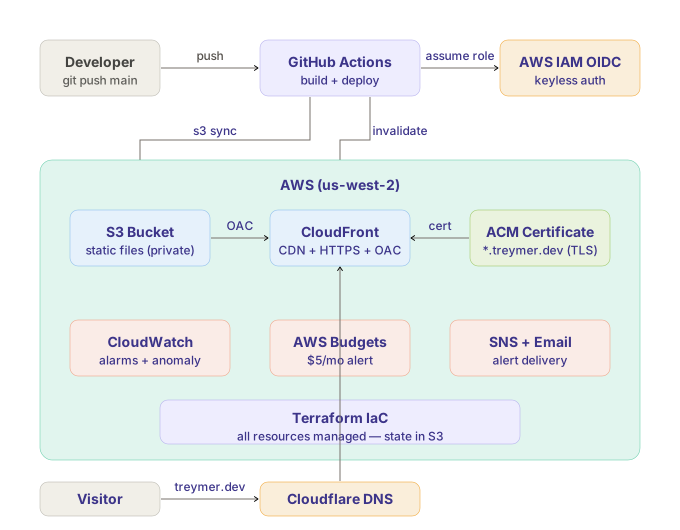
Every AWS resource is defined in Terraform. The deploy pipeline uses OIDC — no access keys stored anywhere.
The Tools
I used two AI coding tools as they serve different purposes:
Cursor is an IDE built on VS Code with AI deeply integrated. It's great for visual work like building React components, seeing your file tree, and getting inline suggestions as you type. When I was building the homepage, about page, and blog layout, Cursor's agent mode was the right tool. I'd describe what I wanted, watch it generate code across multiple files, review the diffs, and accept or reject changes.
Claude Code is a CLI tool that runs in your terminal. It reads your entire codebase and works autonomously! You give it a task, it figures out which files to change, makes the changes, runs the build to verify, and reports back. It's better for larger refactors and multi-file changes. When I redesigned the entire site's color system and theme, Claude Code updated 8+ component files simultaneously while I watched. Magical!
My workflow ended up being Cursor for building new features, Claude Code for refactoring and redesigning existing ones. They complement each other well.
What Surprised Me
How good it is at boilerplate. Scaffolding a Next.js project, writing Terraform for cloud resources, setting up a GitHub Actions workflow with OIDC auth — tasks that would have taken me hours of reading documentation took minutes. The AI knows these patterns cold.
How much it needs steering. This is the part nobody tells you. AI coding tools are incredibly capable but they need a human who understands what good looks like. When Claude Code generated a Terraform resource with a circular reference, I caught it because I know Terraform. When it produced a CloudFront cache configuration, I knew to question the TTL settings. When it wrote a GitHub Actions workflow, I verified the IAM permissions were actually least-privilege.
Without my engineering background, I would have shipped a lot of subtle mistakes.
How natural the iteration loop feels. The cycle of prompt → review → iterate → deploy becomes almost meditative once you get into it. You stop thinking about syntax and start thinking about outcomes. What do I actually want this page to look like? What should this API return? What's the right caching strategy here? Those are the interesting questions. You iterate quickly because your short-term memory is constantly engaged.
How much faster everything moves. I built this entire site — infrastructure, frontend, CI/CD pipeline, design system — in a few focused sessions over a couple of days. That would have taken me weeks doing it the traditional way while managing a full-time job. Talk about 10x productivity!
How My SRE Background Helped
This is the part I find most interesting to reflect on.
Vibe coding works best when you have strong opinions about what good looks like. My SRE background gave me:
Infrastructure intuition. When the AI suggested making the S3 bucket public, I knew that was wrong and redirected it to the OAC pattern. When it generated cloud resource configurations with Terraform, I audited them for best practices. These aren't things a beginner would catch.
Systems thinking. I naturally thought about the full deployment lifecycle — not just "does the site work locally" but "how does this deploy, what happens when it fails, how do I roll back, what monitoring do I need." The CloudWatch alarms and billing alerts I added weren't in the original plan, but they're just what you do when you've been on-call to monitor production systems.
Code review instincts. I treated every AI-generated change like a PR from a junior engineer. Read it, understand it, question anything that looks off. Don't ship what you can't explain.
Debugging mindset. When things broke — and things always break — I know how to read error logs, understand what Terraform was telling me, and trace through the problem systematically.
The SRE skills that felt dormant under all the meetings turned out to be exactly what makes vibe coding effective.
Would I Recommend It?
Yes, with one caveat: you still need to understand what you're building.
Vibe coding isn't magic and it's not a replacement for engineering knowledge. It's an accelerant. If you know what good infrastructure looks like, it helps you build it faster. If you don't, it'll help you build something that looks right but has subtle problems you won't catch until production.
For engineering managers who want to stay technical, this is a great way to do it. Pick a real project that matters to you, use it to explore modern tooling, and let the AI handle the parts you'd have to look up anyway while you focus your attention on the parts that require real judgment.
For engineers at any level, learn these tools now! The developers who understand how to work with AI effectively are going to be significantly more productive than those who don't. That gap is only going to grow. Get ahead of it.
What's Next
This site is a living project. The infrastructure is production-grade and the deployment pipeline is solid, but there's more I want to build:
- A proper API layer with AWS Lambda and API Gateway
- A contact form backed by a Lambda function
- More blog posts on engineering topics, leadership reflections, and the occasional post about guitar, mountain biking, or whatever WoW expansion I'm currently losing sleep over.
If you made it this far, thanks for reading! And if you're an engineering leader thinking about dusting off your technical skills, I hope this was useful.
Now if you'll excuse me, I have a Fury Warrior to level.
For the Horde. 🗡️
Built with Next.js, AWS, Terraform, GitHub Actions, and a lot of help from Claude. The source code is on GitHub.